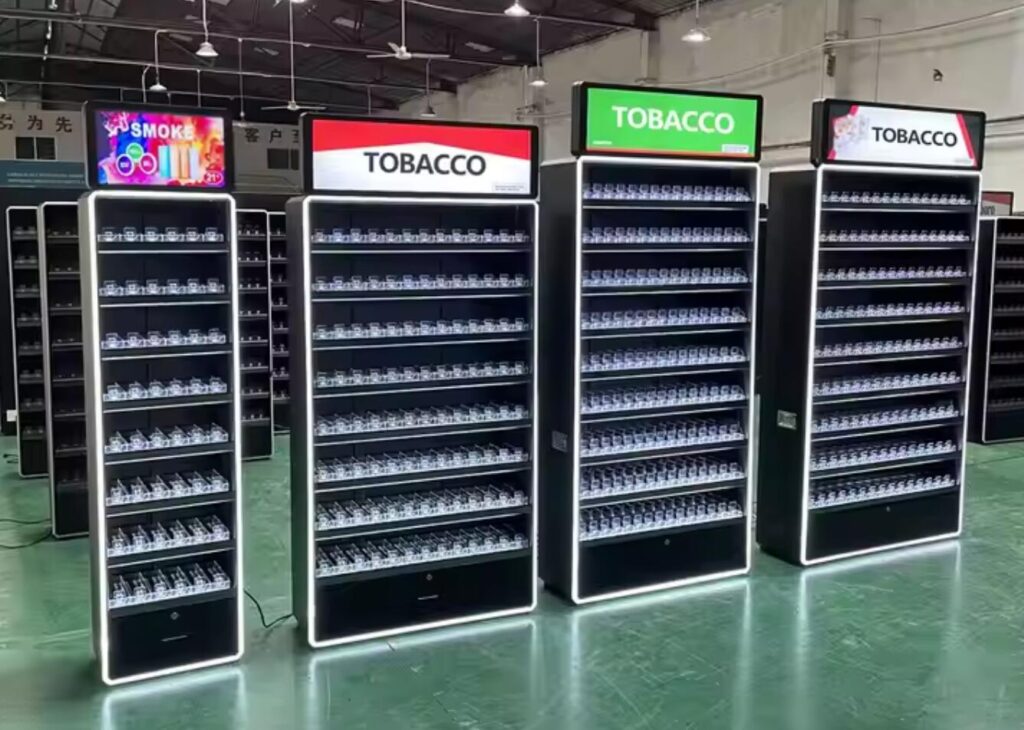
Review tobacco rack merchandising trends against store requirements for display and staff-managed access. A market estimate worth billions provides background. Ask Nova-day what cover, material and storage configurations can be sampled for the actual counter.
Key Takeaways
- Confirm what information may be shown to shoppers and what product information belongs in staff-only storage.
- Compare fixture materials by durability, documented availability and how the parts can be maintained or separated at replacement.
- Modular rack designs are easy to change and organize. This flexibility lets you handle new products and trends. You do not need extra money for changes.
- If an electronic label or QR code is proposed, verify the tag, platform, approved content and allowed position separately.
- Use approved signs and lane labels to help authorized staff identify stock. Confirm which parts may be visible from the shop floor.
Innovative Materials in Tobacco Display Racks
Choosing a Material for the Approved Fixture
Request the actual grades, finishes and service limits. Check what parts can be removed or accepted for recovery locally.
Treat Biofase® and Ingeo® as examples from the material market. Verify any claim on the specific finished part and installation.
Before making a material claim, check the grade, expected service conditions and available recovery route for the finished cabinet.
Modular Rack Designs
Stores want racks that can change easily. Modular tobacco racks let you move things around. Nova-day’s racks use a system that lets you change the setup, swap parts, and fit any space. This design helps you keep your racks neat, even if you get new products.
Here are some things that make modular racks special:
| Feature | Description |
|---|---|
| Heavy-duty build | Stays strong in busy stores and lasts a long time |
| Modular shelves | Makes it easy to restock and keep things tidy |
| Lockable doors | Inspect cabinet closure and the staff release procedure. |
| Customizable parts | Lets you match your store’s look |
| Adjustable shelves | Helps you sort by brand or type |
| Clear panels | Check whether staff can identify packs and price information in the approved position. |
| Modular boxes | Request the complete assembly’s operating range for the actual cabinet. |
You can change your rack’s setup without special tools. Workers can try new displays or set up for holidays fast. If something breaks, you only fix that part. This saves money and keeps your racks looking new. You can also use parts again, so modular racks cost less over time.
Ask which parts the proposed cabinet can change. Have the responsible store contact confirm how any new layout changes visibility, access or supports.
Note: Modular racks make it simple to handle stock and try new setups without needing extra lessons.
Technology Integration in Tobacco Rack Merchandising
Smart Shelving and Digital Labels
Some projects specify electronic labels as an independent component. Confirm label housing and attachment before choosing an ESL bracket.
Check what text can be displayed and who approves it. Confirm separately how the selected platform releases and verifies a price or message.
Here is how digital features help your store:
| Feature | Benefit |
|---|---|
| Electronic Labels | Help with health warning rules |
| QR Codes | Make it easy to track products |
| IoT Technologies | Verify what the approved QR or system interface actually records. |
Test the selected electronic devices and mechanical cabinet separately. Record label updates and failed transmissions, and verify the layout with the site’s approved work process.
Trial a label change and a failed update on the proposed hardware. Use only content approved for that location and product.
Checking Approved Work Lighting
If a rack includes work lighting, confirm where authorized staff may use it. Evaluate the fitted cabinet and power supply at the intended site.
Use LED lighting only within the supplier’s and site’s approved conditions.
- Verify operating temperature, ventilation and the requirements of the exact assembly.
- Check whether light reaches any area where stock or graphics should remain concealed.
- Check whether the intended working surface and staff labels can be read.
Compare two approved fixture configurations using the same installed scope and expected operating hours.
| Fixture lighting check | Evidence to verify |
|---|---|
| Illumination in work area | Measure or observe the actual lamp, diffuser and staff position. |
| Installed power | Check the selected driver, lamps, operating schedule and measured input where available. |
| Service life in the stated conditions | Check replacement interval and access for the exact equipment. |
| End-of-life handling | Identify the locally accepted route for the lamp, driver and mounts. |
| Power and service comparison | Compare approved lighting using the actual driver, operating hours and staff working requirements. Record energy and maintenance as separate measures. |
Keep the approved electrical specification, lamp position and work task with any comparison of energy, cost or visibility.
Recheck cabinet operation and light exposure when a door, shelf or lamp changes.
Testing a Tobacco Rack Layout for Staff Use
Ergonomic and Accessible Designs
Trial the selected fixture during the store’s normal controlled-stock workflow.
Different tobacco racks have their own good points for your store. The table below shows how each rack can help your shop:
| Display Rack Type | Key Benefits |
|---|---|
| Glass Display Cabinets | Check which access controls apply to the exact cabinet and which staff can retrieve packs. |
| Lighted Glass Cabinets | Bright lights make products stand out and get more attention. |
| Wooden Display Cabinets | These last a long time and look nice, so your store stays neat. |
| Corner Display Cabinets | These use space in corners and turn empty spots into places to sell more. |
| Wall Display Cabinets | Check floor footprint, supports and approved clearances in the store. |
| Small Display Cabinets | Verify the set of products and what staff and customers may see in normal use. |
| Vintage Display Cabinets | Compare the approved finish and appearance on the installed sample. |
| Modern Display Cases | Request the material, manufacturing drawing and service limits for the selected unit. |
Check each proposed configuration against approved visibility and staff access.
Clear Signage and Product Grouping
Use the layout drawing to check the intended staff-access positions. Confirm public-facing signs, lighting and product visibility separately.
The table below shows the best ways to use signs and group products:
| Evidence Type | Description |
|---|---|
| Organized Displays | Draw the approved bay and verify staff work, load and access on the sample. |
| Brand Grouping | Confirm whether product identifiers can be visible and to whom. |
| Informative Labels | Test whether staff can match the sign and correct item under normal retrieval. |
| Clear Signage | Test legibility and access during stock retrieval and refill. |
Keep the approved requirements with the drawing and record what changes if labels or products move.
With the cabinet stocked, check label legibility in the approved position and make sure access remains within the intended staff procedure.
Regulatory Compliance and Security Trends
Lockable Trays and Sliding Panels
The industry example describes a particular setting. Record the product category, premises and responsible store contact. Verify permitted visibility, staff access and checkout procedures against the current official requirements for that location.
Test lockable trays on the proposed cabinet. Check how authorized staff retrieve and resecure a pack and review the customer-side view separately.
| Feature | Description |
|---|---|
| Lockable Trays | Inspect closure and staff release on the proposed cabinet. |
| Smart Locks | Check authorization, credential handling and recovery after a failed release. |
| Sliding Glass Doors | Test door travel, overlap, retrieval clearance and reclosure. |
| LED Alerts | If the model includes an alert, test the event, signal and staff procedure. |
| Strong Materials | Verify the material, fixing and service conditions of the specified assembly. |
If the approved cabinet includes a lock or sensor, identify the exact model. Verify normal access, a failed closure and power-loss behavior under the store’s procedure.
Record the tested access procedure and have the site reviewer check the approved product and public views.
Secure Storage Solutions
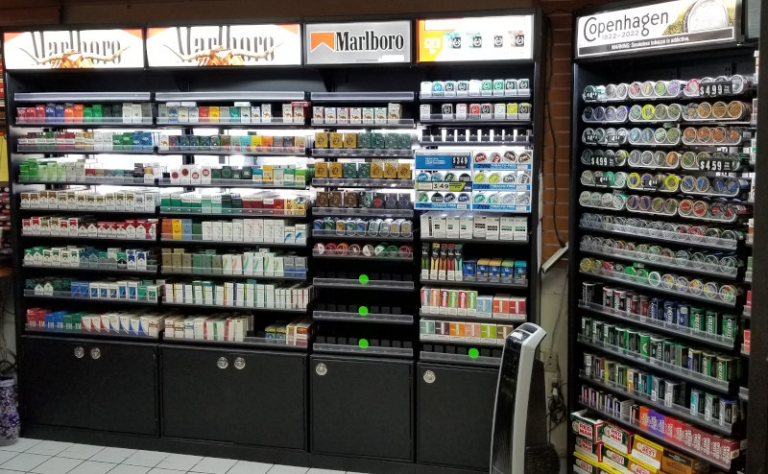
Compare storage options using the store’s approved footprint, authorization process and actual packs. Record closure and staff handling separately from current legal requirements.
| Feature | Description |
|---|---|
| Adjustable Shelving | Move shelves up or down for different products. |
| Locking Storage Options | Test key control and closure under the site’s procedure. |
| Undercounter Cigarette Pushers | Keep cartons neat and easy to grab. |
| Adjustable Pusher Kits | Change where products sit for better reach and view. |
If the approved procedure uses equipment to scan IDs, confirm its authorized role, accepted documents and exception handling with the responsible store contact.
Check stock access, permitted visibility and the approved age-check process independently before authorizing the installation.
Evolving Consumer Preferences in Tobacco Merchandising
Alternative Nicotine Product Displays
Confirm whether the location is allowed to store or sell the specific nicotine products. Check the product list and approved appearance before considering changes to the fixture.
Use the planning reference to scope the update. If tobacco racks change, document permitted products, views and staff retrieval again before fitting.
The electronic nicotine product study concerns the outlets and products observed by its authors. For a fixture brief, verify which exact products the store is permitted to handle and the authorized storage and access steps.
| Product Type | Pack information to obtain | What to verify at the fixture |
|---|---|---|
| Smokeless Tobacco | Record the exact pack dimensions and product identifier. | Check access, storage and visibility against site approval. |
| Spitless Tobacco | Obtain the current pack range and permitted stock position. | Trial identification and closure with the intended packs. |
Use only the approved stock locations and staff access. Check permitted sightlines with the cabinet closed and during service.
Data-Driven Merchandising Strategies
Use the store’s stock and ordering data to compare physical counts, empty positions and replenishment. Document how any result relates to the specific location.
If using heat maps, verify what the data represents and which approved use it supports. Check stock counts and access using the responsible store process.
| Evidence Type | Description |
|---|---|
| Sales Volume Tracking | Record when stock was counted or replenished. |
| Price Elasticity Studies | Match approved prices across applicable systems and printed inserts. |
| Product Placement Impact | Check that the placement is consistent with site approval and staff use. |
| Customer Segmentation | Refer any proposed offer to the store’s compliance owner before changing the fixture. |
| Review permitted Display and Point-of-Sale Information | Review proposed public-facing information with the responsible site contact before changing an insert. |
Keep trial notes for price updates, access and stock handling. Ask staff to report the issues that require a change to the approved layout.
Retail Strategies for Tobacco Display Racks
Space Optimization and Inventory Management
Try revised shelf settings only if the supplier and site approve the configuration. Test the installed pack, opening, access and allowed views on a sample.
After fitting a prototype, time the steps from staff retrieval to securing stock. Check visibility of any required information without assuming that the fixture meets the store’s requirements.
Here is how using space better helps stores:
| Goal | Issue Before | What to Check After a Trial |
|---|---|---|
| Faster service | Staff search for packs | Reference on checkout flow. Time the same request on each layout. |
| Review applicable display rules | Warnings not visible | Check which notices, products and covers are visible from the customer side. |
| Better cash flow | Dead stock piles up | Track actual stock and staff handling for the same products before comparing sell-through. |
Trial dividers or gravity lanes with the actual packs and check which labels are visible in the approved positions.
Tip: Using modular racks helps your store change fast and work better.
Customization for Store Branding
Send Nova Day the authorized footprint, access, finish and concealment requirements. Compare a mock-up with the approved design before selecting a custom cabinet.
Use the linked shopper example as context only. On the sample, check door travel, lane identification and approved sightlines.
See how custom racks help your store:
| Benefit | Description |
|---|---|
| Enhanced Customer Experience | Use the approved samples to test package identification, staff access and stock handling. |
| Staff Workflow Check | Measure lookup, retrieval, refill and closure on the proposed fixture. |
| Professional Atmosphere | Verify the intended location and approved finish with the store’s responsible contact. |
Request the approved adjustment range and have the revised layout reviewed before moving stock.
Document trial results and actual service costs before comparing configurations.
Choose fixtures using approved product, access, visibility and service requirements. Request a Nova Day drawing and quote for the specific assembly.
FAQ
What materials does Nova-day use for tobacco display racks?
Request exact grades and finishes, such as any specified frosted acrylic panels. Check the installed load, cleaning method and any local recovery route separately.
Can you customize tobacco racks for your store layout?
Request a drawing for the quoted dimensions, supported shelf settings and finish. Send the proposed layout for site approval.
How do smart features improve tobacco rack merchandising?
Check electronic labels and QR panels against the actual device, supported platform and store’s approved wording. Review the register’s price verification separately.
Are Nova-day racks suitable for coolers and chillers?
Request the temperature and moisture limits for the complete rack and fittings. Verify cabinet clearance, drainage and the actual operating conditions.
How do lockable trays and sliding panels help with security?
Check which staff may open the cabinet, how they resecure it and what remains visible during retrieval. Review loss records separately.