Skip to content


You can quickly boost retail sales conversion rates. Just swap plain signs with moving screen ads. Old paper signs blend into the background. Because of this, shoppers ignore key store messages. Moving electronic screen promotions grab your attention fast. They can raise overall store sales by 29.5%. These digital displays change the complete customer experience. They improve shopping in every single store aisle. Yet, digital screens need safe physical mounting. You must pair screens with strong mounting hardware. Use special ESL holders and tough POS accessories. This helps build a great store marketing strategy. It safely keeps driving your sales revenue up.
Key Takeaways
- Moving digital screen promotions grab shopper attention.
- They raise store sales by almost thirty percent.
- Put displays at entrances, endcaps, and checkouts.
- This drives impulse buys all over the store.
- Dynamic content scheduling keeps your ads fresh.
- Automated price updates also save employee labor.
- Sturdy mounting hardware protects display screens.
- It also creates a clean, safe store environment.
Deploying In-Store Digital Signage Across Key Zones

Smart hardware placement changes quiet store aisles. It turns them into active sales channels. Put screens where shoppers look and stop. Place displays where customers choose items. Good setups use three main store zones. Use store entrances and endcap shelves. Place screens at cash checkout registers. Putting in-store digital signage here helps buyers. It guides shoppers on a smooth buying path.
| Retail Zone | Primary Strategic Goal | Recommended Hardware Setup |
|---|---|---|
| Entrance | Capture footfall & shape initial perception | Large portrait screens on sturdy floor stands |
| Endcap Shelves | Drive impulse buying in high-traffic aisles | Medium screens paired with POP Pricing Systems |
| Checkout Line | Capitalize on dwell time & urge add-ons | Compact screens secured with ESL plastic holders |
Match screen sizes with your shelf planograms. This method boosts visual impact very easily. It keeps your floor space neat and clean.
Entrance Displays to Capture Initial Footfall
Store entrances build the first customer impression. Put big bright screens near main doors. Mount them right at eye level today. Entrance displays show bright visual ads now. They welcome shoppers into the store space. Ads set a cool high-tech shopping vibe.
Busy store entry areas need clean setups. Vertical screens fit narrow entrance halls best. Horizontal screens suit very wide lobby spaces. Strong mounting tools hold screen units tightly. They secure displays against walls or glass frames. Strong mounts stop screens from shaking around. They shield your pricey screen hardware well. Mounts keep messages clear for big crowds.
Endcap Screens for Driving Impulse Buys
Endcaps get high foot traffic every day. Turn end-of-aisle spots into sales drivers. Use targeted digital signage for promotions here. Moving product videos grab quick buyer attention. They draw shoppers walking down main walkways.
+-------------------------------------------------------------+
|                      ENDCAP DISPLAY SETUP                   |
|                                                             |
|  [ Dynamic Video Screen ] ---> Highlights Featured Product  |
|  [ Nova-day POP System  ] ---> Displays Promo Frame & Signs |
|  [ Nova-day ESL Holder  ] ---> Mounts Digital Tag to Shelf  |
+-------------------------------------------------------------+
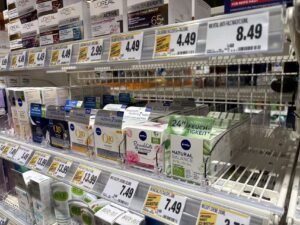
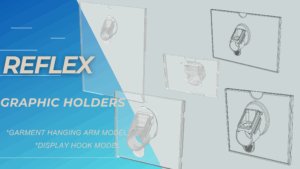
Adding moving screens to shelves needs strong mounts. Nova-day POP Pricing Systems offer strong shelf support. Nova-day Plastic holders for ESL work great. They fit wood, glass, or metal shelves:
- Metal Shelves: Magnetic bases lock holders tight in place.
- Glass Shelves: Anti-slip pads stop screens from sliding around.
- Wooden Fixtures: Adjustable bracket mounts grip digital price tags.
Good hardware holds screens at great angles. Match screen deals with real shelf items. Shoppers spot discounts fast and buy more.
Pro Tip: Align screen brightness and content schedules with your shelf planogram updates. Precise visual alignment ensures that off-shelf promotional prices match on-screen video ads every single time.
Checkout Signage to Maximize Dwell Time
Checkout lines offer great extra sales chances. Shoppers wait in line with free hands. People focus their attention on close objects. Place small display screens over belt lines. Put screens right near cash registers today. Publish fast moving in-store promotions to buyers.Fun screen ads raise buyer interest fast. They entertain shoppers during long line waits. Show fast deals or loyalty reward points. Add seasonal impulse items to the screens. Nova-day POS Accessories help mount tiny displays. They fix digital tags to small counter spaces. Strong hardware stops screens from falling down. Safe setups keep displays safe from knocks. This smart system pushes cart values higher. It increases total store revenue before buyers pay.
Driving Electronic Screen Promotions with Dynamic Content
Paper signs show one deal. New screens show many deals. You can swap pictures fast. Smart electronic screen promotions grab eyes. Motion attracts store shoppers quickly. You manage screens from home.
Dayparting and Time-Sensitive Offer Scheduling
Dayparting targets buyers at times. Set ads for daily crowds. Morning shoppers need quick food. Afternoon crowds like sweet snacks. Changing ads keeps screens fresh.
| Timeframe / Schedule | Promotional Example | Environment |
|---|---|---|
| Morning | Coffee specials and traffic updates | Quick-Service / Restaurants |
| Afternoon | Lunch promotions and product info | Quick-Service / Retail |
| Evening | Happy hour deals and closing notices | Restaurants / Hospitality |
| Limited-Time / Weekend | Urgent sales (e.g., ‘20% off this weekend only’, ‘Happy Hour from 4–6 PM’) | Retail & Quick-Service |
Special events require fast changes. Plan major holiday ads early. Software changes screen ads automatically. Staff skip fixing daily signs.
Automating Real-Time Inventory and Price Updates
Link software to live stock. Systems update shelf prices fast. Workers spend less time updating. Screen prices match register prices.
- Instant Store-Wide Adjustments: Electronic Shelf Labels change prices. They stop manual paper labor.
- Agile Market Response: Fast price changes match rivals. Stores save time and money.
| Metric / Aspect | Manual Pricing | Automated ESL Pricing |
|---|---|---|
| Labor Allocation | Requires extensive employee time for routine tasks | Frees staff from repetitive adjustments to focus on higher-value work |
| Resource Management | Prone to lags leading to stock inefficiencies | Automates routine updates, helping minimize waste and lower holding costs |
| Data Consistency | Higher risk of discrepancy between shelf and register | Ensures tight synchronization between displayed shelf prices and checkout systems |
Implementing automated dynamic pricing typically leads to a reduction of up to 70% in manual pricing workload, shifting the role of pricing teams from manual tag rebuilding to streamlined exception management.
Out-of-stock items stop showing ads. Screens push full stock instead. This saves sales and profit.
Combining Digital Screens with Physical POP Displays
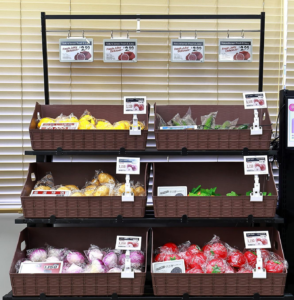
Combine digital screens with fixtures. Nova-day Point of Sales (POS) Accessories enhance screens. Clear frames mount screens safely.
Frames guard delicate digital screens. Use Nova-day shelf sign holders. Put paper signs beside screens. Displays hold logos and codes.
Mix cool videos with holders. Using in-store digital signage works. Clean layouts boost store sales.
Measuring ROI and Optimizing In-Store Promotions
Track sales results now. Prove digital display success. Connect screens with POS data. This reveals real profit growth.
Integrating Display Analytics with POS Data
Easily track sales growth. Compare playback with sales records. Modern retail networks help. They analyze promo impact fast:
- Logs show exact video times.
- POS logs show sales spikes.
- A/B tests compare store sales.
Data proves display success well. It converts shoppers into buyers.
Tracking Dwell Time and Conversion Metrics
Special tools gather shopper data. They track behavior near screens. Wi-Fi and cameras track traffic. They do not interrupt buyers.
| Technology System | Functionality Capability | Primary Metric Tracked |
|---|---|---|
| Radar-based screen sensors | Detects human presence and proximity | Dwell time and viewer counts |
| Wi-Fi and GSM trackers | Captures overall movement patterns | Footfall and aisle traffic |
| POS integration software | Matches screen activity with register data | Direct sales volume |
Track total views and time. Watch touches and items sold. Metrics show grabbed shopper attention.
Testing Call-to-Action Strategies for Maximum Lift
Improve campaigns through continuous testing. Swap colors and video lengths. Change action text every week. Short videos hold attention well. Clear deals speed up buying. Regular testing boosts store revenue.
Execution Best Practices for In-Store Screen Campaigns
Designing High-Impact Visuals for Quick Viewing
Shoppers walk fast. Grab attention in three seconds. Motion graphics boost ad recall by 22%. Short clips change screen messages fast. Hyundai got 8.5 times higher ad recall. They used short motion videos. Bold contrast helps buyers shop easily.
Balancing Promotional Offers with Educational Content
Good electronic screen promotions need balanced content. Informative tips build strong customer trust. Mix direct sales deals with tutorials.
| Content Category | Optimal Share of Content Mix | Core Objective & Focus |
|---|---|---|
| Value-Based Content | 70% – 80% | Delivers education, entertainment, and informative value without requesting direct transactions, thereby establishing consumer trust. |
| Direct Promotional Offers | 20% – 30% | Drives sales conversions through explicit promotional messages and direct commercial calls to action. |
This mix keeps in-store promotions fresh. It prevents driving away cautious buyers.
Maintaining Fixture Stability and Display Safety
Physical hardware safety protects costly screens. It protects store visitors too. Heavy monitors need strong mounting brackets. They need reliable shelf clips. Align setups with safety standards:
- ACA Standards: Mandates proper aisle spacing to ensure safe accessibility and traffic flow around display structures.
- CCOHS Standards: Regulates the structural safety and integrity of physical retail fixtures and heavy-duty display shelving.
Lock digital screens onto shelf channels. This prevents falls in crowded aisles. Sturdy fixtures protect your assets well. They keep the retail space inviting.
Change your store today. Schedule moving ads. Put screens in main spots. Use strong mounts with sales data.
Combine solid holders and POS tools with software. This improves shopping and brings high profits:
| Performance Metric | Retail Industry Benchmark |
|---|---|
| Promoted Goods Sales Lift | 15% to 34% increase |
| Estimated Payback Window | 6 to 12 months |
| 5-Year Cumulative ROI | 280% to 420% |
Modern digital signs make better stores. Check your layout today. Start screen ads to sell more! 💡
FAQ
How do electronic screen promotions increase retail sales?
Moving ads grab eyes fast. Motion shows cool deals. You pick impulse buys. Instant updates match stock. They build big store sales. 💡
Which mounting fixtures work best for digital retail displays?
Pick strong mounts for shelves. Use Nova-day plastic ESL holders. Put anti-slip pads on glass. Use strong magnetic metal clips. Bracket mounts fit wood shelves.
What is dayparting in electronic screen promotions?
Dayparting sets ad times daily. Show early breakfast deals now. Push evening dinner deals later. Ads hit fast buyer needs. They lift total sales fast.
How do physical POS accessories complement digital screens?
POS tools frame screens safely. Pair Nova-day sign holders too. Show clear codes and logos. Print store details right now. Clean setups win store buyers.